
TaxRateCentral Setup Card
The TaxRateCentral Setup Card holds the TaxRateCentral settings for the current company. Open it from the TaxRateCentral Setup action on the Business Manager role center, or search for TaxRateCentral Setup Card in Tell Me.
General
| Field | What it does |
|---|---|
| Enabled | Turns TaxRateCentral on for the current company. When it is off, the app does not assign tax area codes and the job queue update does not run |
| Tax Type | The Tax Type that the app gives to the tax details it creates. The values are Sales and Use Tax, Excise Tax, Sales Tax Only, and Use Tax Only |
Accounts
The app copies these G/L accounts to each tax jurisdiction that it creates.
| Field | What it does |
|---|---|
| Tax Account (Sales) | The sales tax account for the new tax jurisdictions |
| Tax Account (Purchases) | The purchase tax account for the new tax jurisdictions |
| Reverse Charge (Purchases) | The reverse charge account for the new tax jurisdictions |
Note. Fill in Tax Account (Sales) and Tax Account (Purchases) before you load states, load post codes, or process rates. These actions stop with an error when an account is empty.
Options
These options control the automatic assignment of the tax area code. See Tax area assignment for the full rules.
| Field | What it does |
|---|---|
| Update on Customer Event | Assigns the Tax Area Code on a customer when you change the post code, or select a post code or city with the lookup |
| Update on Ship-to Address | Assigns the Tax Area Code on a ship-to address when you change the post code, or select a post code or city with the lookup |
| Update on Sales Document | Assigns the Tax Area Code on a sales document when you change the Ship-to Post Code |
| Update on Service Document | Assigns the Tax Area Code on a service document when you change the Ship-to Post Code |
| Use Primary Record | When more than one tax area matches the post code, the app uses the tax area that has Primary Record on |
| Update Tax Liable | Clears Tax Liable on a sales or service document when the customer has a valid tax exempt certificate for the ship-to state |
| Prompt Update Tax Liable | Asks you before the app changes Tax Liable on a document. You must turn on Update Tax Liable first |
If you turn off Update Tax Liable, the app also turns off Prompt Update Tax Liable. See Tax exempt certificates for when the app does the check.
Note. Make sure that the assigned Tax Area Code and the Tax Liable value are correct for each customer. The app selects values from the post code, the city, and the certificates.
Service Options
The EndPoint URL, API Key, and Timeout fields connect the app to the TaxRateCentral service. See Service connection.
Actions
Related
| Action | Opens |
|---|---|
| States | The States page |
| Post Codes | The Post Codes page |
| Tax Groups | The Tax Groups page |
| Tax Areas | The Tax Areas list |
| Tax Jurisdiction | The Tax Jurisdictions list |
Process
| Action | What it does |
|---|---|
| Create JobQueue Entry | Creates the job queue entry for the monthly rate update. The action shows only when the entry does not exist. See Job queue |
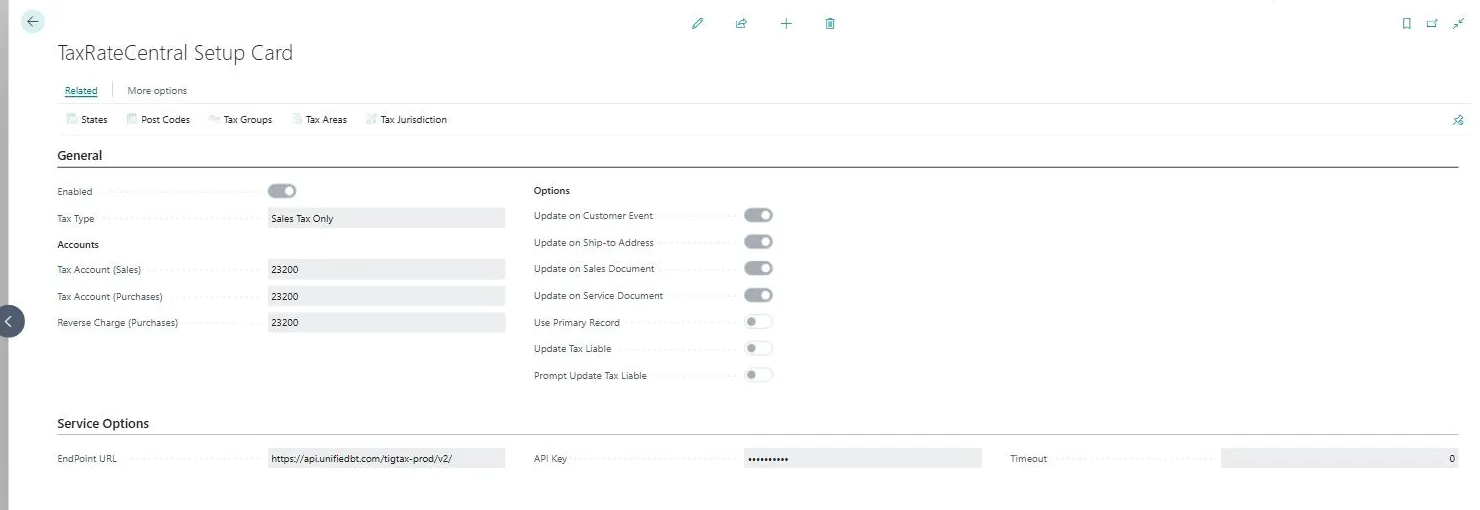 Figure: the TaxRateCentral Setup Card for a configured company.