
Sales Tax Rates Kept Current Inside Business Central
TaxRateCentral populates and maintains sales tax areas, jurisdictions, and rates natively in Microsoft Dynamics 365 Business Central — and assigns the right tax area code to customers, ship-tos, and sales documents by ZIP code.
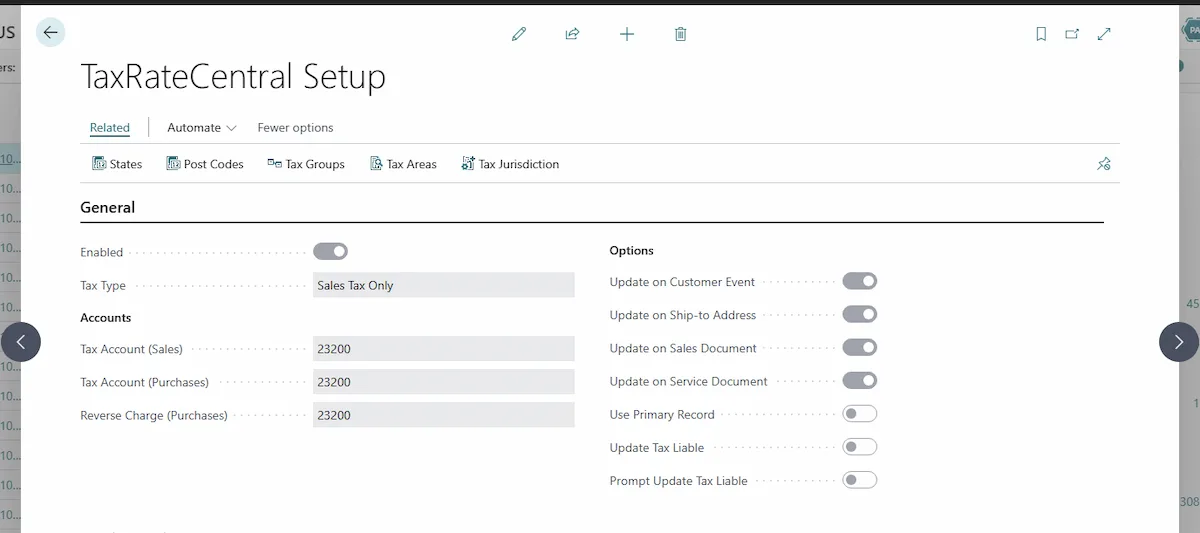
Stop Chasing Sales Tax Rate Changes by Hand
Business Central doesn’t create or update tax area and jurisdiction rate information on its own — so finance teams patch it together manually, and rates fall out of date the moment a jurisdiction changes. That gap quietly turns into under-collected tax, audit exposure, and hours of cleanup.
TaxRateCentral closes it. Fully embedded in Dynamics 365 Business Central, it keeps State, County, City, and special-district rates current for jurisdictions, assigns the tax area code by postal code across customers, ship-to addresses, and documents, and manages exemption certificates — so the tax you calculate and collect is the tax you actually owe.
Sales Tax Compliance, Built Into Your ERP
TaxRateCentral isn’t a bolt-on tax calculator — it extends the sales tax engine already in Business Central so your rates, jurisdictions, and tax areas stay updated without leaving the system. Pair it with Tigunia’s tax rate service (or your own provider) to keep the entire country’s jurisdictional rates up to date, then let TaxRateCentral do the assignment, enrichment, and reporting for you. Key capabilities include:
Automated Jurisdiction Rate Updates
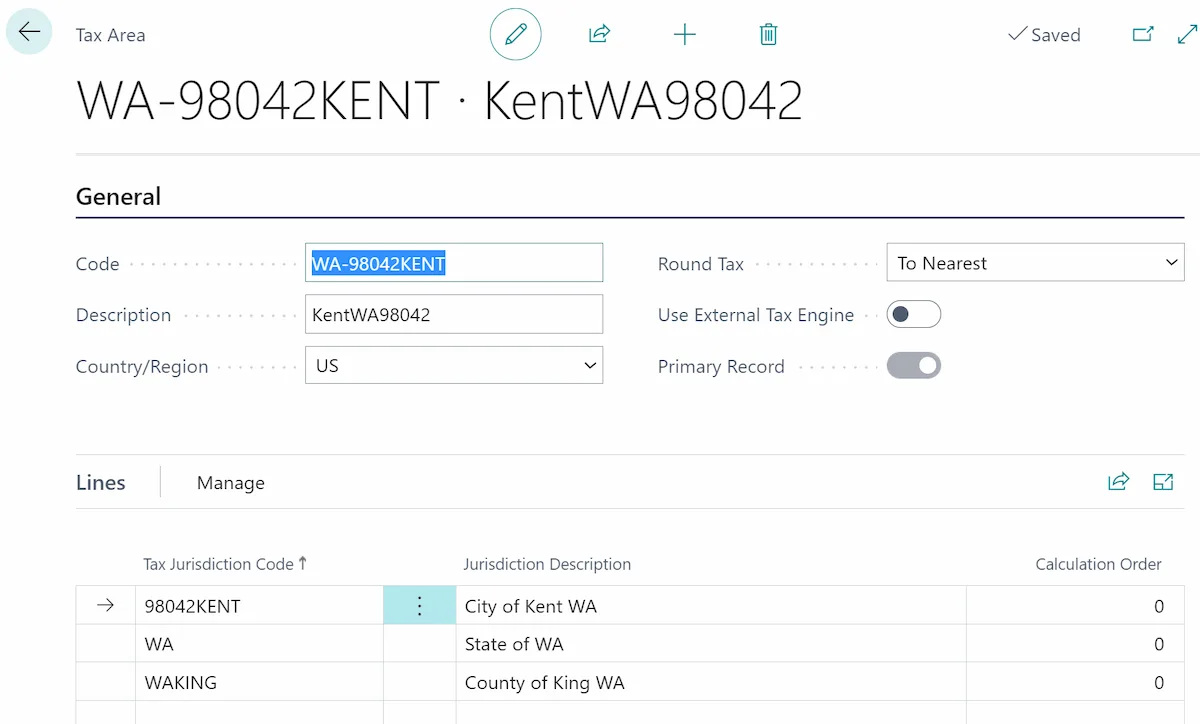
Business Central doesn’t maintain jurisdiction rates on its own. TaxRateCentral does — connecting to a tax rate service and populating the Tax Area and Tax Jurisdiction detail for each state you process, so the rates behind sales transactions reflect what each jurisdiction charges today.
- Populate and refresh State, County, City, and special-district rates for tax jurisdictions.
- Load and process tax data state by state — or run Process All across states you collect in.
- Pull current rates from Tigunia's tax rate service or your own third-party rate provider.
- Build tax area codes and descriptions as each jurisdiction is processed.
- Keep rates tied to specific areas and ZIP codes so calculations stay updated.
Tax Area Assignment by Postal Code
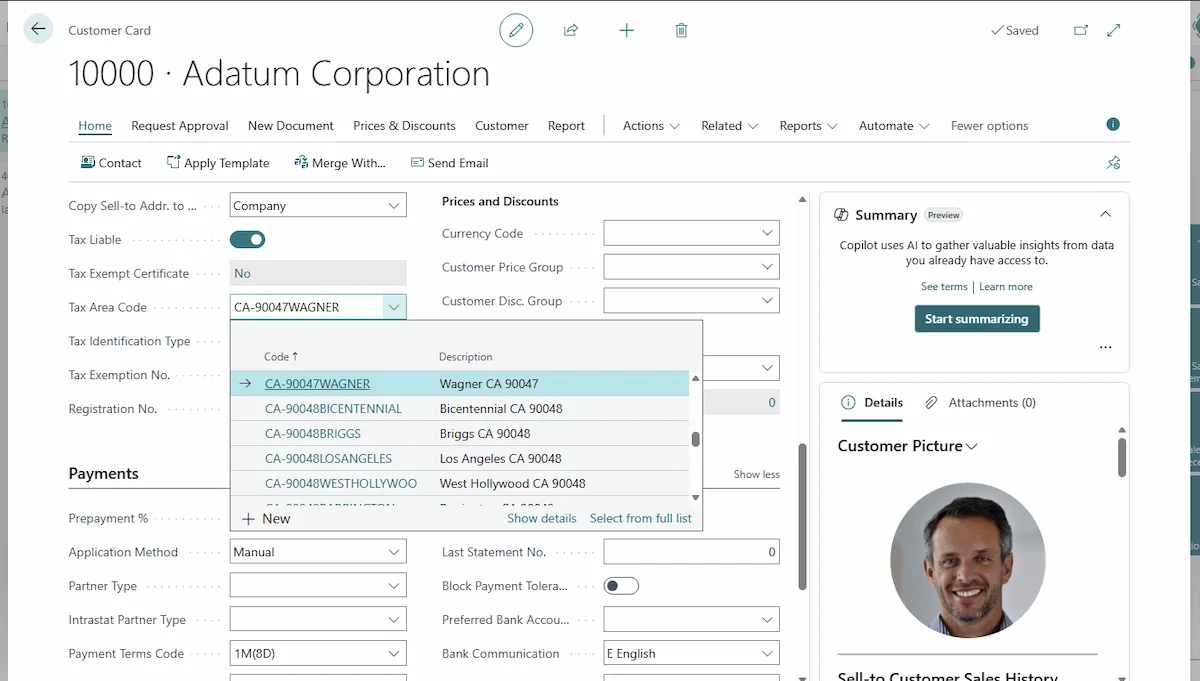
Getting the tax area code right is where sales tax quietly goes wrong. TaxRateCentral assigns it for you based on the post code, matching by post code and city, handling ZIPs that span multiple areas, and honoring a primary record when you’d rather not prompt.
- Assign the correct tax area code to customers, ship-to addresses, and sales documents from the postal code.
- Extend the same assignment to service documents, on both release and posting.
- Resolve the right area when one ZIP maps to multiple tax areas — prompt the user, or use the primary record.
- Trigger assignment the moment a post code is entered and validated.
- Remove the manual lookup-and-type step Business Central otherwise leaves to your team.
ZIP, City, County & State Data — Populated for You
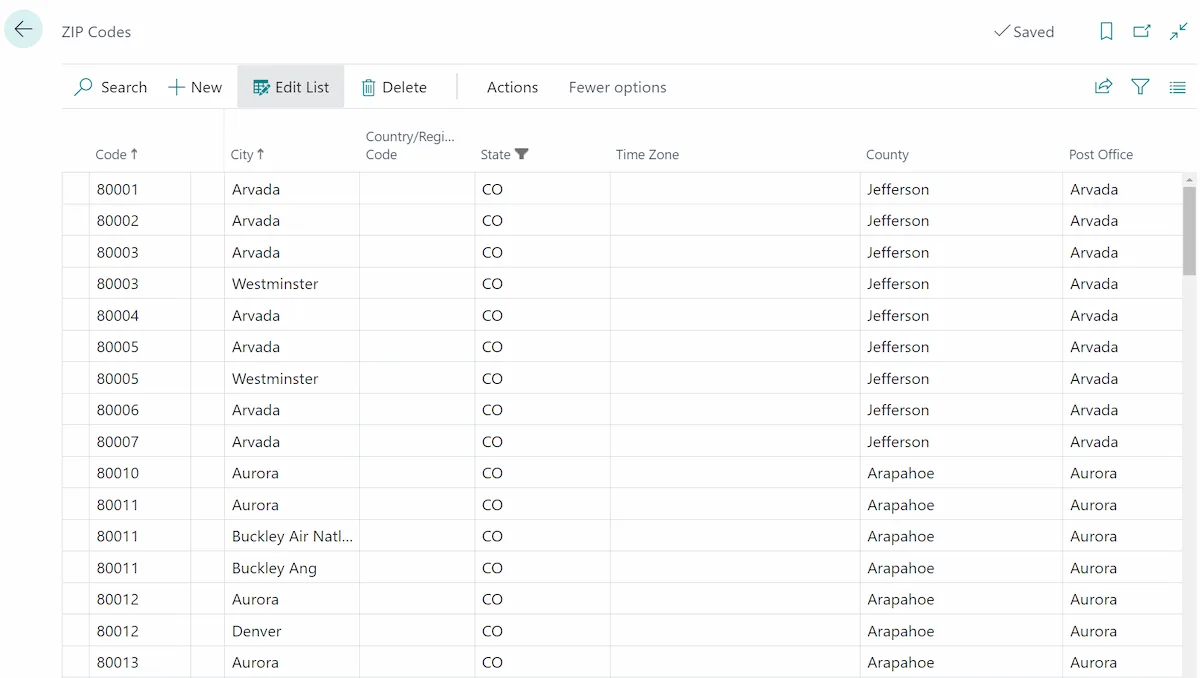
Accurate tax starts with accurate addresses. TaxRateCentral loads and maintains post code data — ZIP, City, County, and State — directly in your Business Central company, adding the County and Post Office detail standard setup leaves blank, so tax area assignment has clean data to work from.
- Load post codes for the entire country with a single action.
- Enrich post codes with County and Post Office detail.
- Keep ZIP, City, County, and State aligned so tax area matching stays reliable.
- Match by post code and city first, then fall back to post code with a guided prompt.
- Give address entry across Business Central consistent, complete location data.
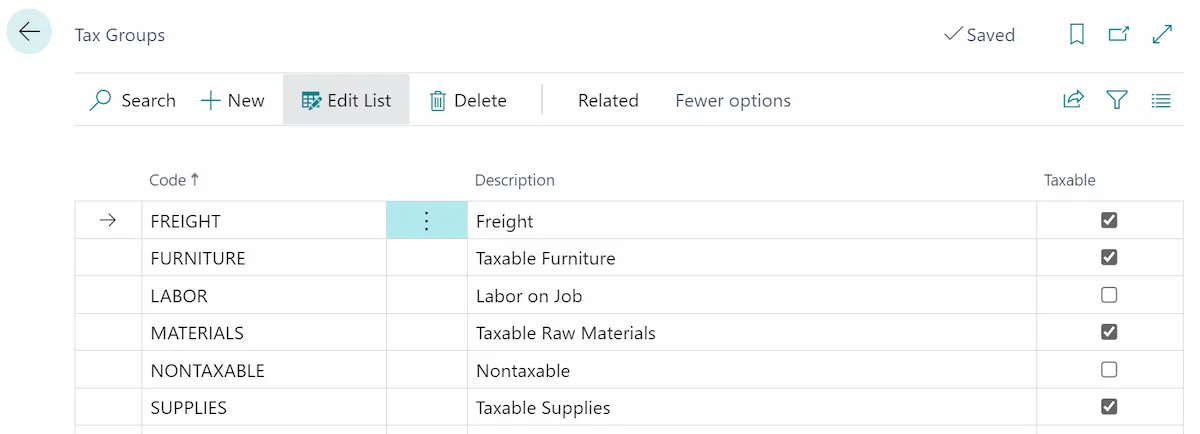
Tax Group Taxability, Overridable by State
Taxability isn’t the same everywhere. TaxRateCentral lets you set a Tax Group’s default taxability and then override it by state, so an item that’s taxable in one jurisdiction and exempt in another is handled correctly — from one group, without workarounds — when rates are populated.
- Flag each Tax Group as taxable or non-taxable to drive Tax Jurisdiction Detail rates.
- Override a Tax Group's taxability state by state on the Tax Group States page.
- Handle products that are taxable in one state and exempt in another — without duplicating groups.
- Set an overall taxability default, then adjust only the states that differ.
- Feed the correct taxability straight into sales tax rate population.
Exemption Certificates, Managed and Audit-Ready
Exemptions are only worth as much as your ability to prove them. TaxRateCentral keeps each customer’s certificates — by state, with the document attached and expiration tracked — right inside Business Central, and can drive the Tax Liable flag on documents from a valid certificate, so exempt sales stay exempt and audits stay painless.
- Store multiple tax exemption certificates per customer, by state, with the file attached in Business Central.
- Import, export, preview, and delete certificate documents from the Customer Card and Customer List.
- Track certificate number, state, and expiration date.
- Set the Tax Liable flag on sales and service documents when a valid certificate exists.
- Retrieve any certificate instantly in the event of a sales tax audit or review.
One System for Rates, Jurisdictions, and Compliance
Ditch the spreadsheets, manual rate lookups, and disconnected tax services. TaxRateCentral brings jurisdiction rates, tax-area assignment, post code data, exemption certificates, and reporting together inside the Microsoft cloud ERP your team already runs on.
- Operates natively inside Microsoft Dynamics 365 Business Central.
- Extends the sales tax engine already in Business Central — no separate tax service to route transactions through.
- No middleware, connectors, or external tax database to maintain.
- A cloud-safe, upgrade-safe extension that survives Microsoft platform updates.
Keep Jurisdiction Rates Up to Date
See how TaxRateCentral maintains current sales tax rates, assigns tax areas by ZIP, and simplifies reporting — all inside Business Central.
Book a DemoTaxRateCentral FAQs
Your most pressing questions about our sales tax rate and jurisdiction management software, answered.
What makes TaxRateCentral different from other sales tax tools?
Most sales tax tools sit outside your ERP and rely on integrations, exports, or a separate tax engine. TaxRateCentral is different — it enhances the sales tax functionality already built into Microsoft Dynamics 365 Business Central. It populates and maintains your Tax Areas, Tax Jurisdictions, and rates in place, and assigns the tax area code to customers and documents, so tax happens inside the system you already run on.
Does TaxRateCentral run natively inside Business Central?
Yes. TaxRateCentral is a Business Central extension installed from Microsoft AppSource — no middleware, no separate database, and no external tax calculation service to route transactions through. It leverages Business Central’s existing sales tax engine and keeps the underlying Tax Area, Jurisdiction, Detail, and rate information current so calculations use updated data.
Where do the sales tax rates come from?
Rates are delivered by a tax rate service that TaxRateCentral connects to through a secure endpoint and API key. A free trial install includes sample tax data so you can see how processing works. Subscribing to Tigunia’s sales tax update service provides an individual API key that unlocks full access to current sales tax rates and jurisdiction information for the entire country. You can also connect a compatible third-party rate service.
Which tax jurisdictions does it maintain?
TaxRateCentral keeps Tax Area information current for State, County, City, and miscellaneous (special-district) jurisdictional taxes. Rates are maintained for specific areas and ZIP codes, and Tax Areas are built from State, County, City, and Miscellaneous sales tax detail as each post code is processed. With a full subscription, coverage extends across the entire country.
How does automatic tax area assignment work?
When a post code is entered and validated, TaxRateCentral can assign the matching tax area code — on customers, ship-to addresses, and sales documents (and, optionally, service documents). It matches on post code and city first; if there’s no single match, it searches by post code. You control this per record type with the Update on Customer, Update on Ship-to Address, Update on Sales Documents, and Update on Service Documents options.
What happens when one ZIP code maps to more than one tax area?
TaxRateCentral handles it. If multiple tax areas exist for a single post code, it will prompt the user to select the correct one — or, if you enable the Use Primary Record option, it applies the tax area flagged as primary for that post code without prompting. Either way, it’s good practice to confirm the assigned code is correct for the customer.
Can it manage customer tax exemption certificates?
Yes. You can store multiple tax exemption certificates per customer, organized by state, with the certificate file attached directly in Business Central. Each record tracks the certificate number, state, and expiration date, and you can import, export, preview, and delete certificate documents from the Customer Card and Customer List — so certificates are easy to retrieve during a sales tax audit or review.
Can a valid certificate update the Tax Liable flag?
It can. With the Update Tax Liable option enabled, TaxRateCentral updates the Tax Liable flag on a sales or service document when a customer has a valid, unexpired exemption certificate for the ship-to state. You can also enable Prompt Update Tax Liable so a user is asked before the change is made. As always, confirm the Tax Liable value on the document is correct for the customer.
Can an item be taxable in one state and exempt in another?
Yes. Business Central Tax Groups determine the taxability of items and resources. TaxRateCentral adds a Taxable flag to each Tax Group and a Tax Group States page where you can override that taxability by state. So a product that’s taxable in one state and non-taxable in another is handled from a single Tax Group — set the overall default, then override only the states that differ.
Can rate updates run on a schedule?
Yes. TaxRateCentral can create a Business Central Job Queue entry that refreshes tax jurisdiction rates for marked states and post codes on a recurring schedule. The job queue entry is created with a status of On Hold so you stay in control of when unattended processing is activated — turn it on when you’re ready for hands-off updates.
How does reporting work for filing sales tax?
TaxRateCentral adds State, County, City, and Special District reporting codes to each Tax Jurisdiction, which simplifies mapping collected tax to the way you file. It also includes a Sales Taxes Collected report that summarizes tax by jurisdiction and a customer certificates report for exemption tracking — giving finance clean, filing-ready data straight from Business Central.
How do we get started, and is there a free trial?
Search for TaxRateCentral on Microsoft AppSource and install the free trial, which includes sample tax data. Setup is minimal: open the TigTax Setup, enter your tax accounts and options, add your subscription API key, then initialize and process the states you collect in. Subscribe to the sales tax update service to unlock full nationwide rates — or book a demo and we’ll walk you through it in your own environment.